

Apply Stronger Access Controls
- View
2.2: Apply Stronger Access Controls [15 minutes]
Building on the identities, roles, and access needs established earlier, the next step is to strengthen how access is granted and used. In healthcare, controls must protect sensitive systems without preventing clinicians from delivering timely care.
Build access around least privilege
Strong access control starts with least privilege: each identity receives only the access required for its current responsibilities. This principle applies to employees, contractors, service accounts, applications, medical devices, and other non-human identities.
Least privilege has three practical dimensions:
-
Scope: Which systems, records, and functions can the identity access?
-
Time: How long does the identity retain that access?
-
Context: Under what circumstances may the identity use it?
For example, a respiratory therapist may need to view relevant clinical records and document respiratory treatments. That role does not automatically require permission to change billing codes, administer the identity platform, or export large groups of patient records.
Strong access is not simply “allowed” or “denied.” It limits who can perform which action, on which resource, under which conditions, and for how long.
Choose an appropriate authorization model
Organizations commonly use several authorization models together.
| Model | How access is determined | Healthcare application | Main consideration |
|---|---|---|---|
| Role-based access control (RBAC) | Permissions are assigned to job roles | Nurses receive a standard set of clinical permissions | Roles must remain specific enough to prevent excessive access |
| Attribute-based access control (ABAC) | Policies evaluate identity, resource, and environmental attributes | Access depends on department, facility, patient relationship, device status, or time | Attribute quality and policy design are critical |
| Just-in-time access | Elevated access is granted temporarily when needed | A support engineer receives administrative access for an approved maintenance window | Access must expire automatically |
| Privileged access management (PAM) | High-risk accounts and permissions receive additional controls | Database administrator credentials are stored, checked out, and tightly controlled | Privileged identities must not bypass normal accountability |
RBAC provides a manageable foundation because healthcare responsibilities often map to recognizable job functions. However, a role alone may be too broad. Two nurses with the same role may work in different facilities or units and therefore require access to different patient populations.
ABAC can add that context. A policy might permit access only when all of the following are true:
-
The user has an active nursing role.
-
The user is assigned to the patient’s care team or unit.
-
The request originates from an approved device.
-
The requested action is appropriate for the user’s role.
-
The access occurs during an active work assignment.
RBAC answers, “What does this role normally permit?” ABAC adds, “Is this particular request appropriate under the current conditions?”
Prevent role accumulation
Users often gain access as they transfer between departments, accept temporary assignments, or take on additional duties. If old permissions are not removed, they accumulate over time. This is sometimes called privilege creep.
Suppose a staff member moves from patient registration to clinical research. Adding the researcher role without removing registration permissions leaves the person with access from both positions. Strong access control treats a transfer as a replacement of responsibilities, not merely an addition.
A sound role-change process should:
- Identify the permissions required for the new position.
- remove access associated only with the previous position;
- preserve shared permissions that remain justified;
- add the new role’s approved permissions; and
- set an expiration date for any temporary access.
Shared accounts undermine this process because permissions cannot be tied reliably to one person. Wherever practical, each workforce member should use an individual identity, including when accessing shared clinical workstations.
Require stronger proof and safer sessions
Authorization determines what an identity may do. Authentication assurance determines how confidently the organization knows who or what is using that identity.
Passwords alone provide limited assurance because they can be guessed, reused, shared, or stolen. Stronger controls use multifactor authentication (MFA), requiring evidence from more than one factor category:
-
Something the user knows, such as a password or PIN
-
Something the user has, such as a security key or managed device
-
Something the user is, such as a biometric characteristic
Two passwords do not constitute MFA because both belong to the same factor category.
Match authentication strength to risk
Requiring the same authentication process for every request can create unnecessary friction without adequately protecting high-risk actions. A better approach is to match authentication strength to the sensitivity and context of access.
| Access situation | Appropriate control direction |
|---|---|
| Routine use of an approved clinical workstation | Normal organizational authentication with a controlled session |
| Remote access to clinical or administrative systems | MFA and device or network checks |
| Access from an unfamiliar or unmanaged device | Stronger verification or denial |
| Privileged administrative access | Phishing-resistant MFA and tightly controlled privileged credentials |
| Sensitive action during an existing session | Step-up authentication before the action |
| Non-human application connection | Managed certificate, key, token, or workload identity rather than a human password |
Step-up authentication requires additional proof when the user attempts a higher-risk action. For example, a billing employee may already have an authenticated session but must provide another factor before changing payment details or exporting sensitive data.
MFA is strongest when the method resists phishing and unauthorized approval. Controls should also prevent users from selecting a weaker method whenever a stronger method is required for the resource.
MFA reduces the risk of stolen credentials, but it does not correct excessive permissions. Authentication and authorization must be strengthened together.
Apply conditional access
Conditional access evaluates the context of a request before allowing it, denying it, or requiring an additional control. Useful conditions include:
-
User or workload identity
-
Assigned role
-
Requested application or resource
-
Device ownership and security status
-
Network or geographic context
-
Authentication method
-
Time of access
-
Sensitivity of the requested action
Consider a clinician who signs in remotely to review a patient record. The clinician has the correct role, but the request comes from an unmanaged personal device. Depending on organizational policy, the system might deny access, provide only limited browser access, or require the clinician to use an approved managed device.
Conditional policies should be understandable and testable. A large collection of overlapping exceptions can produce unpredictable results and make legitimate care workflows difficult to support.
Control the session after sign-in
Access control does not end when authentication succeeds. Session controls reduce the chance that another person can use an unattended or stolen session.
Relevant controls include:
-
Automatic locking after an appropriate period of inactivity
-
Reauthentication before sensitive actions
-
Limits on session duration
-
Restrictions on copying, downloading, printing, or exporting data
-
Secure termination of sessions on shared devices
-
Protection of authentication tokens from reuse
-
Prevention of simultaneous or inappropriate sessions where justified
Healthcare environments require careful tuning. An inactivity timeout that is too long may expose an unattended workstation, while one that is too short may repeatedly interrupt clinical work. Technologies such as rapid badge-based sign-in can help preserve both usability and individual accountability on shared workstations.
Protect privileged and emergency access
Privileged identities can change configurations, create accounts, modify permissions, access large amounts of data, or disrupt critical systems. Because their impact is greater, they require stronger controls than ordinary user identities.
Separate routine and privileged identities
Administrators should not use privileged accounts for email, web browsing, or routine office work. Instead, they should have:
-
A standard identity for normal activities
-
A separate privileged identity for approved administrative work
This separation limits exposure. If the standard account is compromised, the attacker does not automatically obtain administrative permissions.
Privileged access should also be narrow and temporary. Rather than giving an administrator permanent control over every environment, the organization can grant a specific privilege for a defined task and time window. The access should expire automatically instead of depending on someone to remember to remove it.
A strong privileged access design may include:
-
Approval before elevation
-
MFA using a strong authentication method
-
Access through a controlled administrative environment
-
Credential or secret storage in a managed vault
-
Automatic credential rotation
-
Time-limited elevation
-
Prohibition of shared privileged credentials
-
Separate privileges for production and nonproduction systems
Service accounts and application identities also deserve privileged treatment when they can access sensitive data or critical infrastructure. Their secrets should not be embedded in source code, configuration files, or scripts that many users can read. Prefer managed workload identities or centrally protected secrets with the smallest required permissions.
Preserve emergency clinical access
Strict least privilege can conflict with urgent patient care if a clinician needs information outside the normal assignment model. Healthcare organizations commonly address this need with controlled emergency access, sometimes called break-glass access.
Emergency access should not become a general workaround. It should require a deliberate action and provide only the access necessary for the emergency.
A typical design includes:
- The user signs in with an individual identity.
- Normal policy denies the requested access.
- The user selects an emergency-access option.
- The system requires a reason and, where appropriate, stronger authentication.
- Temporary access is granted to the necessary information.
- The access expires when the emergency window ends.
This approach balances confidentiality with patient safety. It is stronger than sharing a universal emergency password because each use remains associated with an individual identity.
Emergency administrative accounts may also be necessary if normal identity infrastructure becomes unavailable. Such accounts should be few in number, securely protected, limited to recovery purposes, and excluded from everyday use.
Avoid exception-driven policy design
Healthcare workflows contain unusual situations, but every exception weakens consistency. Before adding an exception, determine whether the need can be addressed through:
-
A more accurate role
-
A contextual attribute
-
Temporary elevation
-
Step-up authentication
-
A controlled emergency-access path
Permanent broad access should not be the default solution to temporary or uncommon needs.
Apply controls as a coordinated policy
The controls in this lesson work best as layers rather than isolated features. A user with MFA but excessive privileges remains dangerous. A tightly limited role can still be misused if authentication is weak. A secure sign-in may still expose information through an unattended session.
For a clinical application, a coordinated access decision might evaluate the following sequence:
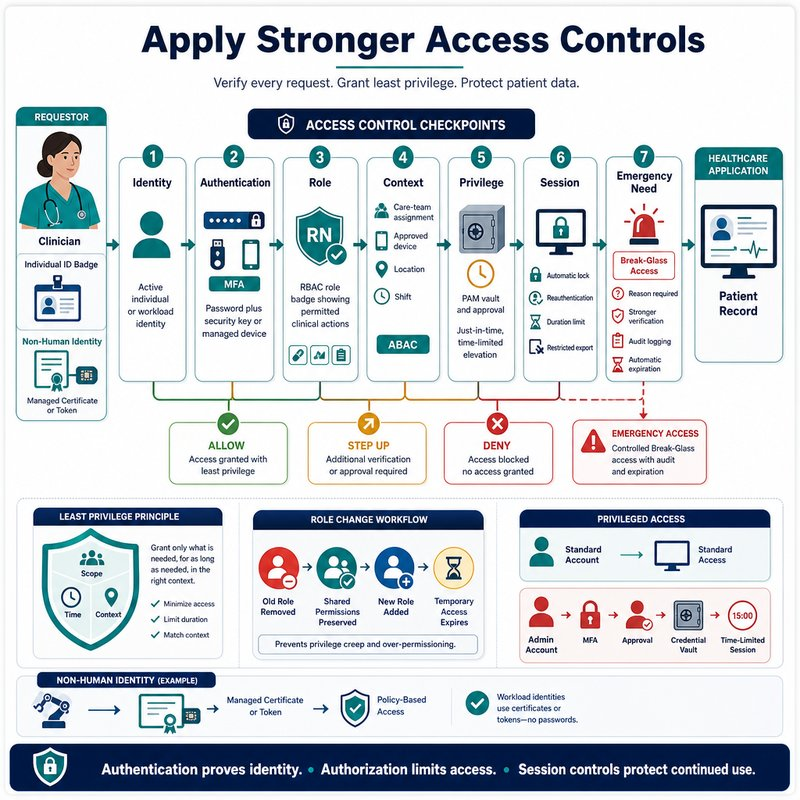
- Identity: Is the account active and associated with the correct person or workload?
- Authentication: Has the identity provided the required level of proof?
- Role: Does the assigned role permit this type of action?
- Context: Is the device, location, assignment, and access path acceptable?
- Privilege: Is elevated access required, and is it approved and time-limited?
- Session: What restrictions should continue after access is granted?
- Emergency need: If normal access is insufficient, is controlled emergency access appropriate?
This layered approach supports both security and clinical usability. Routine, low-risk work can proceed through well-designed roles and approved devices, while sensitive, unusual, or privileged activity receives stronger controls.
Common misconceptions can lead to weak implementations:
-
“MFA makes an account secure.” MFA strengthens authentication but does not limit what the account can access.
-
“Everyone in the same department needs the same access.” Patient relationships, duties, facilities, and shifts may require more precise controls.
-
“Administrators need permanent access in case something happens.” Temporary elevation can provide necessary access without maintaining standing privilege.
-
“Shared clinical workstations require shared accounts.” A shared device can still support individual authentication and accountability.
-
“Emergency access must bypass all controls.” It should bypass only the restriction preventing necessary care while preserving individual authentication and limited access.
-
“Service accounts are less risky because no person signs in with them.” Non-human identities may have broad, persistent access and therefore require equally careful protection.
Recap
Stronger access controls combine least privilege, role and attribute-based authorization, MFA, conditional access, secure session handling, privileged access controls, and carefully limited emergency access. The goal is to provide each human and non-human identity with the minimum appropriate access under clearly defined conditions.
Once these controls are in place, the organization must be able to recognize when identities, privileges, or access behavior indicate danger. The next lesson, Monitor and Respond to Identity Risks, addresses that next step.