

Review the Onboarding Learning Path
- View
A clear route from entry to readiness
A new employee opens your Moodle onboarding course and completes the first knowledge check. The score is 60%, but the next page gives no clear direction: should the employee retry, read a guide, or continue? A learning path can contain useful content and still fail if learners cannot understand what happens next.
This lesson follows a sample employee onboarding course with a welcome page, a knowledge check, a support guide, and a final readiness activity. The review focuses on whether these parts form a clear, reliable route through the course. By the end, you will be able to explain the route, recognize common problems in its Moodle settings, and judge whether learners receive useful guidance.
Read the path as a learner journey
In the sample course, employees first read the welcome page and take a knowledge check. A score of at least 80% opens the final readiness activity; a lower score opens a support guide and leaves the knowledge check available for another attempt. The score changes what becomes available, so learners receive different routes toward the same goal.
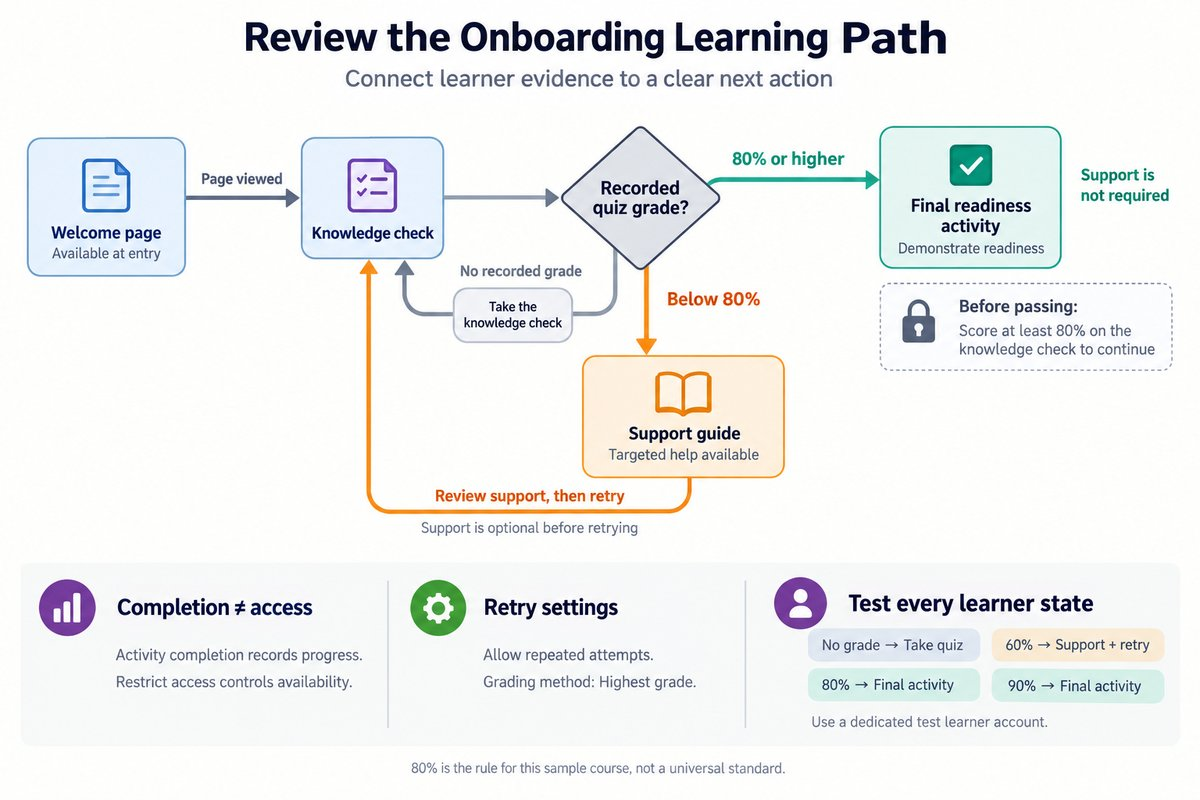
This is an adaptive learning path: a route that changes in response to learner evidence, such as a quiz grade. Onboarding introduces learners to the information and actions they need to begin a role. In this example, the shared goal is to recognize safe workplace actions, not simply to visit every course page.
A useful review connects three parts: the intended outcome, the evidence of readiness, and the next available action. The decision point, where a learner’s result changes the route, should use evidence that matches the outcome. For example, an 80% threshold is meaningful only if the questions test important onboarding knowledge; it is an illustrative course rule, not a universal standard.
| Path element | Rule in the sample course | Purpose of the review |
|---|---|---|
| Welcome page | Available at entry | Confirm that learners understand the route |
| Knowledge check | Available after viewing the welcome page | Confirm that learners can reach the decision point |
| Support guide | Available after a recorded score below 80% | Confirm that learners receive relevant help |
| Final readiness activity | Available at 80% or higher | Confirm that access reflects the intended standard |
| Retry route | Knowledge check remains available | Confirm that learners can recover after a low score |
The table describes the intended behavior, not proof that Moodle is configured correctly. A strong review checks both the written plan and the actual learner experience. Clear course text cannot repair an incorrect restriction, and a correct restriction cannot explain itself to a confused learner.
Separate completion from access
A learner may finish a quiz attempt without meeting the required standard. Moodle can record that an activity is complete while another activity remains unavailable. This difference matters when reviewing an onboarding route: “finished” and “ready to continue” do not always mean the same thing.
Activity completion records whether a learner has met an activity’s configured completion conditions. Depending on the activity and settings, this might mean viewing a resource, submitting work, receiving a grade, or achieving a passing grade. Restrict access controls whether an activity or resource is available under specified conditions. These features can work together, but they serve different purposes.
| Review question | Activity completion | Restrict access |
|---|---|---|
| What does it control? | Whether completion conditions are met | Whether the learner can access an item |
| Sample use | Record that the welcome page was viewed | Open the knowledge check after that completion |
| Grade-related use | Require a passing grade for completion | Open the final activity at 80% or higher |
| Common mistake | Treat any completed attempt as a pass | Assume a completion marker automatically locks later content |
In the sample course, a knowledge-check grade of 60% should not open the final activity merely because the attempt is complete. A grade restriction on the final activity can enforce the 80% requirement directly. If access instead depends on passing completion, the quiz’s passing grade and completion conditions must match that intention.
A useful review traces each rule back to its evidence. For a welcome page, a viewing condition may be suitable, although it does not prove understanding. For readiness, a relevant quiz grade provides stronger evidence than a page view. Neither completion tracking nor access restrictions alone establish that a learner can perform a workplace task.
Check every route, including the way back
The easiest route to notice is the successful one: a learner scores 90% and continues. The more revealing route starts with 60%, moves through support, and returns to the knowledge check. A review needs to follow both routes, along with the state before any grade exists.
A grade restriction is an access condition based on a recorded grade. In the sample course, the support guide uses a grade below 80%, while the final activity uses a grade of at least 80%. A learner without a grade has not earned a zero; the learner has no result yet. The entry instructions must therefore remain visible without depending on either graded route.
| Learner state | Support guide | Final readiness activity | Expected direction |
|---|---|---|---|
| No recorded grade | Not yet available | Not available | Take the knowledge check |
| 60% | Available | Not available | Use support, then retry |
| Exactly 80% | Not available | Available | Continue to readiness activity |
| 90% | Not available | Available | Continue to readiness activity |
The exact boundary deserves attention. Moodle grade restrictions use an inclusive minimum and an exclusive maximum, so a minimum of 80% includes 80%, while a maximum of 80% means below 80%. Matching these limits prevents a gap at the threshold. If the intended plan is different, such as keeping support available to everyone, the restrictions should reflect that plan rather than this example.
The return route also depends on quiz settings. The sample course allows repeated attempts and uses Highest grade, the grading method that keeps the learner’s best attempt as the quiz grade. With only one permitted attempt, “try again” becomes an empty promise. With a different grading method, a later passing attempt may not produce the course grade needed to unlock the next activity.
Review the route through an experienced employee’s eyes
An experienced employee, Jordan, reads the welcome page and scores 90% on the knowledge check. Jordan already meets the sample course’s knowledge standard, so the support guide is not required. The review checks whether Moodle provides a direct route to the final readiness activity without adding unnecessary work.
- Input: welcome page viewed. Its completion condition is met, allowing access to the knowledge check.
- Input: submitted attempt graded at 90%. The quiz records a grade above the 80% threshold.
- Input: recorded grade of 90%. The final activity’s grade restriction is satisfied.
- Input: final activity opened. Jordan receives instructions for demonstrating readiness.
A hidden problem appears if the final activity also requires completion of the support guide. Jordan cannot complete a guide that the course makes unavailable at 90%, so the extra condition blocks the intended route. This is a dead end: a state in which the learner has no valid way to continue. Removing an unnecessary support-completion requirement aligns the settings with the planned route.
The benefit is a shorter, more relevant onboarding experience for employees who already meet the knowledge standard. The limitation is that a high quiz score shows performance on those questions, not full workplace competence. The final readiness activity still needs to match the organization’s onboarding requirements, especially where a practical demonstration is necessary.
Review the same path after a low score
Follow Casey’s Route Back to Readiness
Another employee, Casey, scores 60% on the same knowledge check. The support guide becomes available, and the final activity remains locked. The guide explains the workplace rules tested in the quiz, while visible instructions tell Casey how to return for another attempt.
- Input: first attempt graded at 60%. The below-80% restriction makes the support guide available.
- Input: support guide opened. Casey receives explanations linked to the knowledge gaps.
- Input: second attempt graded at 90%. Highest grade updates the quiz grade to 90%.
- Input: updated grade of 90%. The final activity becomes available.
The review must distinguish access to help from a requirement to use it. In this sample, the guide is available after a low score, but opening it is not required before retrying. That makes the route simple and avoids a circular dependency, where two activities each require completion of the other. If course instructions say “You must complete the guide before retrying,” the settings would need to enforce that different design.
Casey’s route shows how targeted support can reduce unnecessary repetition while keeping a shared readiness standard. Its limitation is that access records do not show whether Casey understood the guide. The course creator should therefore judge the route by the quality of the support and the evidence collected afterward, not merely by whether the guide was opened.
Confirm what learners actually see
A course creator may see activities that are hidden or restricted for learners. Moodle’s Switch role to feature can help inspect the course’s appearance, but it does not fully reproduce a real learner’s grades and completion history. A reliable review therefore includes a dedicated test learner account in a safe test course or approved testing environment.
A practical review follows a small set of evidence-based checks:
- Input: course outcome and path plan. Identify which result should open each activity.
- Input: activity settings. Confirm that completion conditions, restrictions, attempts, and grading methods support that plan.
- Input: test learner with no grade. Confirm that entry instructions and the knowledge check are reachable.
- Input: test results below, at, and above 80%. Confirm that each result opens the intended route.
- Input: a low result followed by a passing result. Confirm that the learner can recover and continue.
The review also includes the wording around locked activities. Moodle can display an unavailable activity with restriction information or hide it, depending on the restriction settings. For this onboarding path, a visible message such as “Score at least 80% on the knowledge check to continue” helps explain the next action. A hidden item may keep the page simpler, but learners still need visible guidance somewhere they can access.
A path that stays clear at every turn
A reliable onboarding path connects evidence to action without leaving learners guessing. Completion records progress, while access restrictions control availability. The review becomes useful when it checks the starting state, the passing route, the support route, and the return after a retry.
-
Review the purpose: Each decision point should support the onboarding outcome.
-
Review the settings: Completion, grades, restrictions, and retry rules must agree.
-
Review the learner experience: Instructions should explain both locked activities and available next steps.
-
Review recovery: A low score should lead to useful support and a workable route forward.
Next, we'll build on this by exploring Plan Your Next Steps in Adaptive Course Design.