

Define Completion for Course A
- View
Make “finished” mean ready to move forward
A company offers two safety courses: Course A, Workplace Safety Basics, and Course B, Workplace Safety Decisions. Some employees open every resource in Course A but do not pass its quiz. Others pass the quiz but miss a required safety checklist. Which employees should count as finished?
An adaptive learning path—a route that changes according to a learner’s progress—needs a clear answer. Moodle must record completion using evidence that matches your course goals. In this lesson, you will define that evidence and configure Course A so its completion status has a clear, reliable meaning.
Separate activity completion from course completion
A learner submits a quiz and earns a passing score. Moodle can use that result to mark the quiz complete, then use the completed quiz as one requirement for completing Course A. These are two related decisions, not one setting.
Activity completion records whether a learner has met the requirements for a specific activity or resource. Course completion records whether the learner has met the selected requirements for the whole course. Course completion can use activity completion as evidence, but finishing an activity does not automatically mean finishing the course.
| Decision | Activity completion | Course completion |
|---|---|---|
| Main question | Has the learner finished this item? | Has the learner finished Course A? |
| Example evidence | Passed the Safety Check quiz | Completed all selected required activities |
| Where it is defined | Within the activity’s completion settings | On the course completion settings page |
| Common mistake | Treating a quiz attempt as proof of passing | Assuming every course activity is automatically required |
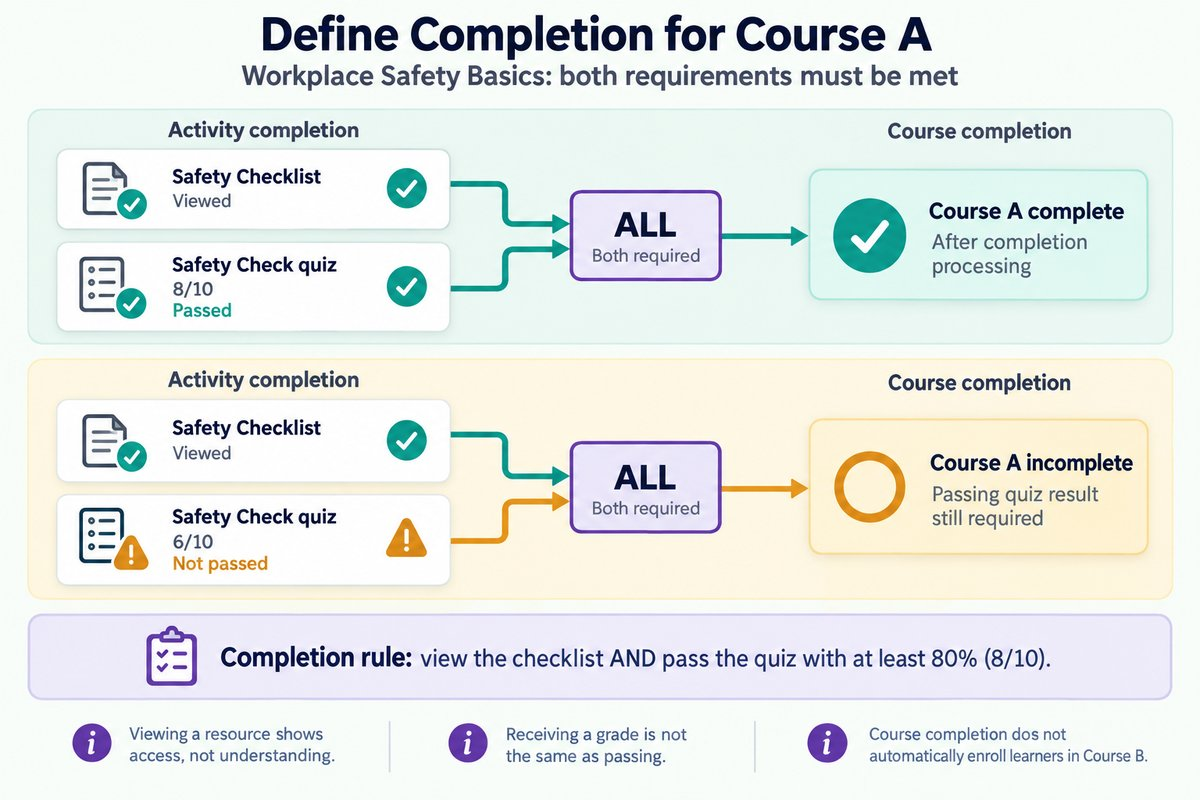
For Workplace Safety Basics, a useful completion rule is: Complete the Safety Checklist resource and pass the Safety Check quiz with at least 80%. The checklist provides evidence that the learner opened the required guidance. The quiz provides evidence of basic understanding, within the limits of the questions asked.
Course completion records a status; it does not, by itself, enroll a learner in another course or control access to it. Restrict access, Moodle’s feature for controlling availability, is a separate mechanism. Keep today’s goal narrow: create a dependable completion record for Course A.
Choose evidence that matches the learning goal
The strongest completion rule starts with what learners need to demonstrate. For this course, the goal is to recognize common workplace hazards and choose an appropriate first response. A quiz can test those decisions, while opening a resource can only show that the learner accessed it. The evidence should support the claim you make when you call someone “complete.”
A useful principle is alignment: the learning goal, assessment, and completion rule should point toward the same outcome. If understanding safety procedures matters, a recorded quiz attempt is not enough. If access to a required reference matters, viewing that reference can be a reasonable supporting condition. Avoid adding requirements simply because Moodle offers them.
| Evidence choice | What it can show | Important limitation |
|---|---|---|
| View a resource | The learner opened the resource | It does not prove careful reading or understanding |
| Receive a quiz grade | A graded attempt exists | The grade may be below the passing threshold |
| Pass a quiz | The result meets the defined threshold | It covers only the knowledge tested |
| Manually mark an item complete | The learner reports completion | It does not independently verify performance |
For Course A, the 80% threshold is an example policy decision, not a Moodle recommendation. A safety lead should confirm that the questions and passing standard fit the course’s purpose. A well-configured completion rule cannot repair a weak assessment.
State the rule in learner-facing language before configuring it. For example: “To complete Workplace Safety Basics, open the Safety Checklist and earn at least 8 out of 10 on the Safety Check quiz.” This gives learners a visible target and gives course creators a precise rule to implement. It also reduces confusion when a learner has finished one requirement but not the other.
Configure the evidence before the course rule
Moodle needs completion tracking enabled before it can record the activity evidence used by the course rule. Completion tracking is the system that records whether completion conditions have been met. A site administrator controls whether this feature is available, and the course must also have it enabled. Navigation and setting labels vary by Moodle version and theme, so the labels below may appear in slightly different locations.
Use a course that has not yet launched when possible. Changing completion settings after learners have started can affect existing records, and Moodle may lock settings or warn about removing completion data. Agree on the rule first, then configure it before enrollment begins. This protects both learner expectations and reporting consistency.
- Confirm site support. Have an administrator confirm that completion tracking is enabled at the site level. The output is an available completion tracking feature.
- Enable tracking in Course A. Open the course settings and set Enable completion tracking to Yes. Save the settings so activities can record completion.
- Set the quiz passing grade. In the Safety Check quiz settings, set Grade to pass to 8 when the quiz’s maximum grade is 10. The output is a defined 80% passing threshold.
- Set quiz completion conditions. In the quiz’s activity completion settings, choose automatic completion and require a passing grade. Where Moodle shows a separate requirement to receive a grade, enable it as needed; do not treat receiving a grade alone as passing.
- Set resource completion. In the Safety Checklist resource settings, choose automatic completion and require the learner to view the resource. Save the settings so opening it supplies the required completion evidence.
Pay close attention to quiz settings that allow completion after all available attempts are used. That option can allow completion without a passing result, depending on the selected conditions. It does not match Course A’s rule that every completing learner must pass. Leave that alternative out of this design, and make sure the allowed attempts support the organization’s retry policy.
Require all the selected evidence
Why Course A Needs Both Requirements
Once the activity rules exist, the course needs a rule for combining them. Aggregation means combining several conditions into one result. For Course A, the checklist and quiz must both be complete, so the appropriate choice is All, not Any.
The difference matters even when only two activities are involved. With Any, opening the checklist could satisfy the course’s activity completion condition without a passing quiz result. With All, an incomplete quiz keeps that condition unmet. The number of selected activities does not determine the rule; your intended learning requirement does.
| Learner evidence | All selected activities required | Any selected activity required |
|---|---|---|
| Checklist viewed; quiz score 6/10 | Requirement not met | Requirement met through the checklist |
| Checklist not viewed; quiz score 8/10 | Requirement not met | Requirement met through the quiz |
| Checklist viewed; quiz score 8/10 | Requirement met | Requirement met |
Configure the course rule using the two activities already defined. Moodle may also show an overall aggregation setting for combining different types of course completion conditions. Keep this example focused on activity completion and avoid enabling unrelated conditions such as a completion date or manual approval. Extra conditions can change the meaning of “finished” or delay it unexpectedly.
- Open Course completion. Use Course A’s course navigation or administration menu to reach the completion settings. The output is the course-level rule editor.
- Select the required activities. Under the activity completion condition, select Safety Checklist and Safety Check. The output is a defined set of required evidence.
- Require all selected activities. Set the activity aggregation to All. The output is a rule that requires both items.
- Review the overall conditions. Confirm that only the intended completion conditions are enabled and that the overall aggregation matches the policy. Save the course completion settings.
The resulting chain is simple: viewing the checklist completes one requirement, and passing the quiz completes the other. Once Moodle processes both records, Course A can be marked complete. A score of 6/10 must not produce the same course outcome as 8/10.
Example: a learner passes but misses the checklist
Maya earns 9/10 on the Safety Check quiz, but she has not opened the Safety Checklist. Her quiz meets its automatic completion requirement. Course A remains incomplete because the course rule requires both selected activities.
- Quiz result: 9/10. Moodle records a passing result and marks the quiz complete.
- Checklist status: not viewed. The resource remains incomplete.
- Course rule: All. One required activity is missing, so Course A does not yet meet its completion requirements.
- Checklist opened. The resource becomes complete, and Course A becomes eligible for completion processing.
This outcome supports an onboarding process in which every employee must access the same safety reference. It avoids treating a high quiz score as permission to skip that requirement. Its limitation is important: opening the checklist does not prove that Maya read every line. The completion record supports a specific claim about access, not a wider claim about careful reading.
Example: a learner finishes an attempt but does not pass
Jordan opens the Safety Checklist and scores 6/10 on the quiz. The checklist is complete, but the quiz has not met its passing requirement. Receiving a grade does not make Jordan ready to complete Course A.
- Checklist opened. Moodle records the resource as complete.
- Quiz result: 6/10. The score falls below the required 8/10, so the passing condition remains unmet.
- Later permitted attempt: 8/10. With the quiz grading method set to Highest grade, the recorded quiz grade meets the threshold.
- Both requirements met. Course A becomes eligible for completion processing.
The grading method determines how multiple quiz attempts produce the recorded grade. In this example, Highest grade allows Jordan’s improved result to meet the standard; another grading method may produce a different result. Course creators should check that attempt limits, grading method, and passing threshold work together. This keeps the completion rule consistent with the organization’s learning and reassessment policy.
Read completion status with care
Activity and course status do not always update at the same moment. Course completion may depend on scheduled tasks, background jobs that Moodle runs through its scheduling system, often called cron. A short delay does not necessarily mean the completion rule is wrong. If the status remains unchanged, an administrator may need to check that scheduled tasks are running.
Use Moodle’s Activity completion report to inspect individual activity records and the Course completion report to inspect course-level requirements. A teacher’s preview or role switch is not always a reliable replacement for a real learner record. Before launch, confirm the behavior with an appropriately enrolled test learner and the relevant reports.
A reliable definition of Course A completion has three parts:
-
Meaningful evidence: The checklist is viewed, and the quiz is passed.
-
Consistent settings: The passing grade, activity conditions, and course rule agree.
-
A clear learner message: Learners know exactly what they must finish.
Next, we'll build on this by exploring Prepare the Plugin and Connect Course A to Course B.