

Key Concepts Review
- View
Key Concepts Review in UX Design for e-Commerce [20 minutes]
Understanding UX Design in e-Commerce: Why It Matters
Imagine logging onto your favorite e-commerce website, hoping to find a particular product quickly. However, the website is cluttered, searching takes forever, and the checkout process is a nightmare. Frustrated, you abandon your cart and head elsewhere. This is a classic example of poor User Experience (UX) design in action—a crucial aspect in e-commerce where seamless navigation can make or break a sale.
UX design is essential in e-commerce because it directly impacts customer satisfaction, engagement, and ultimately, sales. In a competitive market, delivering a superior user experience can be the differentiator that drives repeat business. Today's lesson will delve into key UX concepts and how they play into the world of e-commerce.
Key Principles of UX Design
What is UX Design?
User Experience (UX) Design is the process of creating products that offer meaningful and relevant experiences to users. It involves designing the entire process of acquiring and integrating the product, including aspects of branding, design, usability, and function.
-
Usability: Ensures the product is easy to use.
-
Accessibility: Makes sure everyone can use the product, regardless of disabilities.
-
Desirability: Elements that make a product design desirable emotionally and aesthetically.
UX Design differs significantly from User Interface (UI) Design; while UI focuses on the interface itself, UX is an overarching term for the user's journey with the product.
UX Design Process
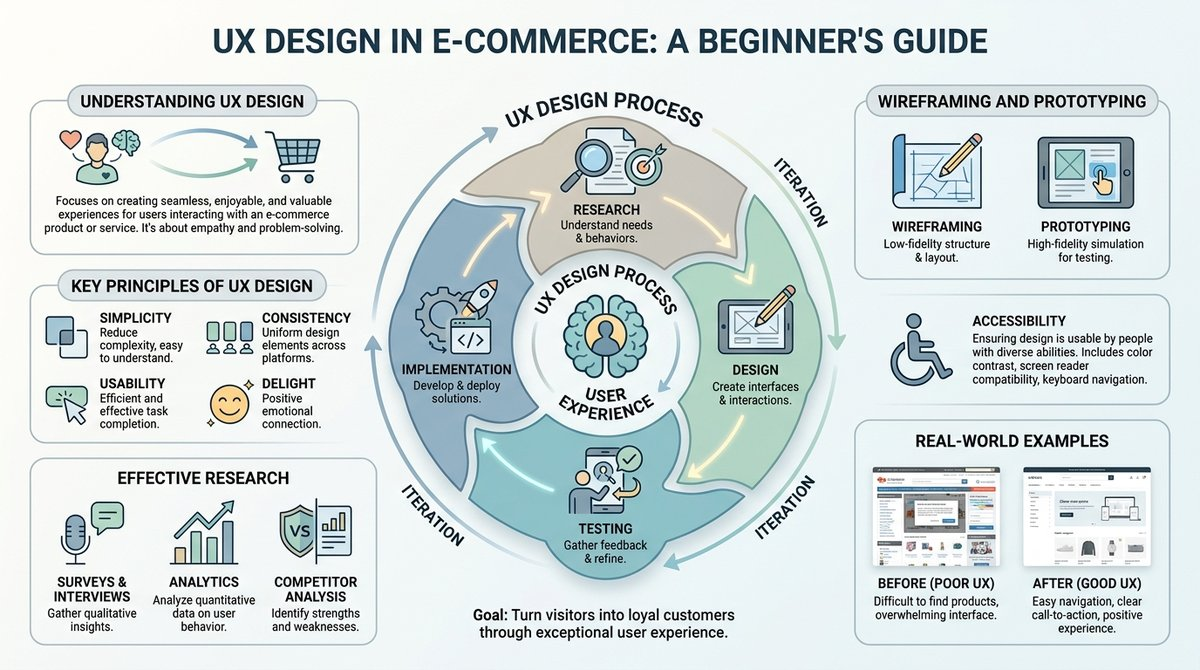
The UX design process generally includes the following stages:
| Stage | Description |
|---|---|
| Research | Gathering information about users and their needs, understanding pain points. |
| Design | Creating wireframes, mockups, and prototypes to visualize solutions. |
| Testing | Evaluating designs with real users, gathering feedback, and iterating. |
| Implementation | Developing and deploying the design while ensuring a seamless experience through ongoing testing and optimization. |
Understanding these stages ensures you can tailor e-commerce websites to meet and exceed user expectations seamlessly.
Diving Deeper Into UX Best Practices
Effective Research and Its Importance
User research is foundational to any UX project. It involves understanding the user's needs, behaviors, and motivations through various methodologies, including interviews, surveys, and focus groups.
-
Best Practices:
Use diverse research methods to gather comprehensive insights.
Prioritize direct user feedback to inform design decisions. -
Common Pitfalls:
Relying too heavily on assumptions rather than factual data.
Skipping user research due to time or budget constraints, leading to designs that fail to meet user needs.
Wireframing and Prototyping
Wireframing is the process of creating a simplified blueprint of a website or app. It allows designers to focus on layout and functionality without distractions from visual elements.
-
Best Practices:
Start with low-fidelity wireframes to iterate quickly.
Utilize both paper sketches and digital tools to create diverse perspectives. -
Common Misconceptions:
Believing wireframes are substitutes for final visual designs; they are guides, not detailed designs. -
[[flowchart-placeholder]]
The Role of Accessibility in UX Design
Accessibility in UX design ensures your digital products can be used by everyone, including people with disabilities. It's not just a legal requirement but a business opportunity—more inclusive designs can reach a wider audience.
-
Best Practices:
Incorporate accessibility from the beginning, not as an afterthought.
Regular testing with assistive technologies like screen readers to identify issues. -
[[plantuml-c4-placeholder]]
Real-World Examples in e-Commerce
Case Study: Streamlining Checkout Processes
Many e-commerce platforms have reported significant drops in cart abandonment rates by simplifying checkout procedures. For example, an online clothing retailer observed a 30% increase in completed purchases after implementing a single-page checkout process, reducing unnecessary steps and minimizing user friction.
Steps involved:
- Identifying pain points such as multiple checkout steps that involve re-entering information already provided.
- Designing a unified form that dynamically adjusts based on user input.
- Testing with users to ensure satisfaction with the new streamlined process.
Case Study: Improving Site Navigation
A global electronics e-commerce site improved usability by revamping their navigation structure. Initially, users struggled with a cumbersome menu that listed too many categories. By conducting user research and tree testing, the company consolidated similar categories and implemented a mega-menu format.
Impact and Benefits:
-
Enhanced user satisfaction due to easier navigation.
-
A noticeable uptick in session durations and conversion rates.
-
Reduction in bounce rates, as users found what they needed more efficiently.
These examples illustrate the tangible benefits that well-executed UX design can bring to e-commerce businesses, showcasing how informed design decisions based on user research can directly translate to improved business metrics.
Bringing It All Together
Throughout this lesson, we've highlighted key UX design concepts and their crucial role in elevating the e-commerce experience. A robust UX design process, including rigorous user research, effective wireframing, and an emphasis on accessibility, lays the groundwork for user-friendly and profitable online platforms.
Next, we'll build on this by exploring Applying UX Design in e-Commerce, where this becomes even more practical. As you continue, remember the core takeaways, and you'll be well-equipped to tackle real-world UX challenges with confidence.