

Basics of Wireframes and Prototypes
- View
Building the Blueprints: Wireframes and Prototypes in e-Commerce UX Design
Imagine you're shopping online for a new pair of sneakers. The website is colorful, sleek, and intuitively guides you from browsing to checkout. But did you ever wonder about the magic that brings this seamless experience to life? Behind the scenes, wireframes and prototypes serve as the essential blueprints of this digital world. Understanding these tools is crucial for anyone stepping into UX design, especially within the e-commerce realm where user experience can make or break a sale.
The Foundations: Understanding Wireframes and Prototypes
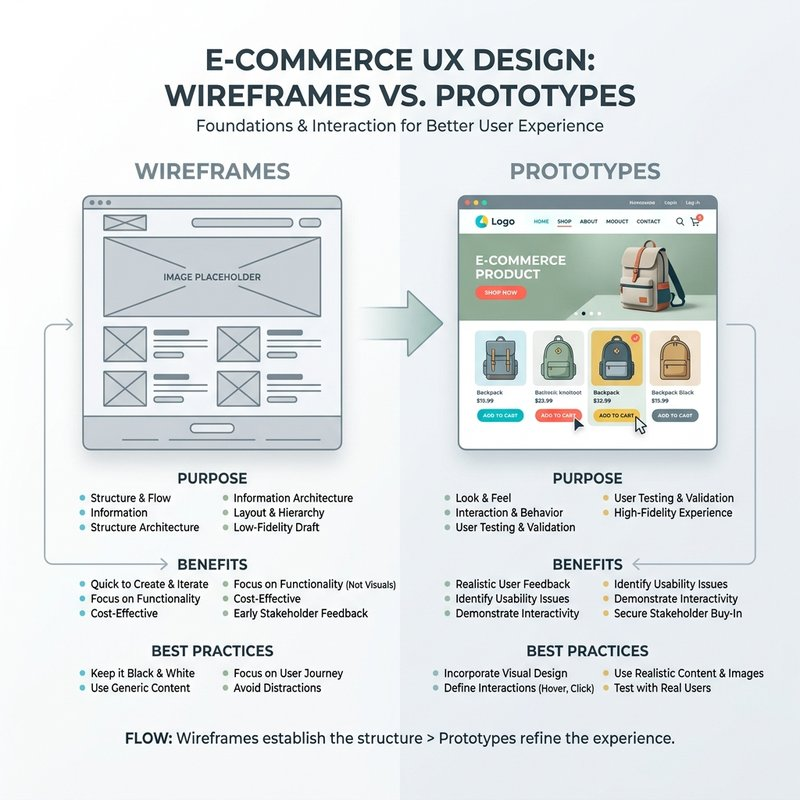
Wireframes: At their core, wireframes are skeletal frameworks of a website or app. Think of them as the architectural blueprint of a house. They outline the basic structure, layout, and functionality without getting caught up in the aesthetic details. Wireframes help UX designers plan where elements like images, text, buttons, and navigation menus will be placed.
Prototypes: These are more advanced, interactive models that simulate the final product. Prototypes allow designers to test user interactions with the planned features and functionalities. Imagine a prototype as a fully furnished model home you can walk through before it's built.
Both wireframes and prototypes are pivotal in the design development process for e-commerce platforms. Proper use helps ensure that user needs are met efficiently and effectively.
Diving Deeper: Wireframes and Prototypes Explained
Wireframes
-
Purpose and Benefits:
Clarity of Structure: Wireframes depict the layout of a page without the distraction of color or graphics, ensuring the focus remains on functionality.
Improved Communication: They facilitate discussions between UX designers, developers, and stakeholders by providing a tangible reference for design decisions.
Cost-Effectiveness: Adjustments in the wireframe stage are cheaper than in later stages. -
Best Practices:
Simplicity is Key: Use basic shapes and lines to sketch the layout.
Prioritize Content Hierarchy: Ensure that important elements like call-to-action buttons, headlines, and images are prominently placed.
Iterate Often: Regular revisions based on team feedback can save time and resources down the line.
Prototypes
-
Purpose and Benefits:
Interactive Testing: Prototypes allow real users to interact with elements as they would in the final product, providing invaluable feedback.
Design Validation: They validate the usability and functionality of the wireframe, bridging the gap between design and development. -
Best Practices:
Functionality Over Form: Ensure that the prototype accurately represents interactions rather than stylistic attributes.
User-Centric Approach: Constant usability testing with real users is crucial to affirm assumptions and refine design.
Feedback Integration: Use insights from testing to iterate and refine the prototype, enhancing user experience.
Common Misconceptions:
-
Wireframes are Just Sketches: While often simplified, they are strategic tools integral to successful UX design.
-
Prototypes Equal Product: Prototypes are iterative and evolve as feedback is gathered, not the end product itself.
Real-Life Application: Wireframes and Prototypes in e-Commerce
Consider an online bookstore specializing in rare books.
Scenario 1: Shopping Cart Wireframe
-
Problem: Many customers abandon their carts because of complicated navigation.
-
Solution: Design a wireframe focusing on a streamlined checkout process. This includes a simple, step-by-step layout where each page guides customers through adding an item, entering payment details, and receiving confirmation.
-
Impact: By visually mapping out every stage in the checkout process, potential pain points are identified early on, allowing the team to streamline user interaction paths from selection to purchase.
Scenario 2: Prototype for Personalization
-
Problem: Limited engagement with personalized book recommendations.
-
Solution: Develop a prototype to test a personalized suggestion carousel based on previous purchases and browsing history.
-
Outcome: User testing reveals that recommendation placement and access speed impact interactions. Enhancements to load time and navigation based on these insights encourage prolonged user engagement and reduced bounce rates.
Bridging the Concepts: Insights and Practical Relevance
In exploring the roles of wireframes and prototypes, it's evident that both play distinctive yet interlinked roles in the UX design process. Each serves to validate ideas and ensure functionality aligns with user needs, providing a comprehensive toolkit for designers entering the e-commerce industry.
Looking Back at Your Journey Through This Part
-
Wireframes Unraveled: You've mastered how wireframes act as a foundational guide for design layout and architecture.
-
Prototyping in Action: You have seen firsthand the importance of prototyping in testing and iterating on the user experience.
-
Real-World E-commerce: You’ve learned practical applications of these tools within the e-commerce space, enhancing understanding through real-world context.
As you continue forward, remember that the effectiveness of a wireframe and prototype lies not merely in their creation, but in their strategic use and adaptation. Embrace this design blueprint and confidently propel your e-commerce projects to meet user expectations while fostering innovation.