

Plan Your Next Steps in Adaptive Course Design
- View
Turn a course idea into a focused plan
Your customer support onboarding course has one clear goal: help new employees handle refund requests correctly. Some employees already know the policy, while others need examples and guided support. Making everyone follow the same route can waste time, but adding too many routes can make the course difficult to maintain.
The next step is to plan a small, reliable adaptive learning path: a route through course content that changes according to evidence about a learner’s needs. In Moodle, this can use assessment results and access conditions rather than a separate system that predicts what each learner needs. A useful plan connects the learning goal, the routing rules, and the evidence you will review after launch.
By the end of this lesson, you will understand how to:
-
Choose a manageable first improvement.
-
Describe a Moodle path with clear access rules.
-
Plan testing, review, and ongoing ownership.
Connect each route to a learning need
A learner takes a short refund-policy quiz and earns 60%. Moodle keeps the final case assessment locked, while the learner can review worked examples and try the quiz again. When the learner reaches the required score, the final assessment becomes available.
This is rule-based adaptation: course access changes when a defined condition is met. The rule does not explain every reason for a low score, and it does not automatically create personalized teaching. The course creator must choose suitable evidence, useful support, and a clear route forward.
Three Moodle terms help make this plan precise:
| Moodle term | Meaning | Role in the refund course |
|---|---|---|
| Activity completion | A record that an activity’s configured requirements are met. | Records that an employee has finished the final assessment under the chosen conditions. |
| Restrict access | Settings that control access using conditions such as grades or completion. | Keeps the final assessment locked until the quiz grade reaches 80%. |
| Grade to pass | The grade an activity treats as a passing result. | Defines 80% as the quiz’s passing grade; it does not create access restrictions by itself. |
These settings serve different purposes, so a plan should name the exact condition that controls each route. Opening a page is evidence of access, not proof of understanding. Likewise, a quiz score supports a routing decision only when its questions match the skill being checked.
Start with one decision point
A strong first plan changes one meaningful part of the learner’s experience. For the refund course, the decision is whether an employee needs policy support before attempting a realistic customer case. This keeps the design focused on an observable outcome: choosing the correct refund action and explaining it accurately. It also limits the number of rules the course team must check.
A minimum viable adaptive path is the smallest useful path that addresses a learning need and can be tested reliably. “Minimum” does not mean incomplete or low quality. It means avoiding extra branches until there is evidence that they help. For example, the first version can offer one support resource rather than separate resources for every incorrect quiz answer.
A common misconception is that more branches always produce better personalization. Extra routes can increase maintenance work and create confusing access conditions without improving learning. Start with a decision that changes the help a learner receives, not just the order of pages. In the refund course, employees who demonstrate policy knowledge move directly to the final case, while those below the threshold receive a clear recommendation to review examples and retry.
| Planning dimension | Focused first version | Overextended first version |
|---|---|---|
| Routing decision | One policy-knowledge checkpoint | A separate route for every quiz response |
| Support content | One focused set of refund examples | Many small resources with overlapping content |
| Testing effort | Check the threshold and retry route | Check many combinations of conditions |
| Maintenance | Update a small set of connected items | Track changes across many dependent routes |
Write the rules before changing settings
A routing rule needs a clear input and a visible result. In the refund course, the input is the learner’s recorded quiz grade, and the result is access to the final case assessment. The support examples remain available to everyone, so employees can return to them even after passing. This avoids making useful help disappear when a learner’s score improves.
A decision rule states the evidence, condition, and resulting action. “Learners who struggle receive support” is too vague to configure or test. “Learners with a recorded quiz grade below 80% are directed to refund examples and can retry the quiz” is much clearer. The 80% threshold is an illustrative design choice, not a universal Moodle recommendation.
The plan must also explain how repeated attempts affect the recorded grade. Moodle quizzes can use different grading methods when multiple attempts are allowed, such as the highest grade or the last attempt. For this course, using the highest grade means a later lower score does not remove access already earned through a passing score. This supports a stable route, but a short quiz still cannot prove that an employee can handle every real customer request.
The planned sequence is:
- Input: refund-handling goal. Identify the policy decisions that matter; output: quiz questions aligned with those decisions.
- Input: submitted quiz attempt. Use the recorded grade; output: a route based on whether the grade reaches 80%.
- Input: grade below 80%. Recommend the refund examples and keep the quiz available; output: a supported retry route.
- Input: grade of 80% or higher. Make the final case assessment available; output: an opportunity to demonstrate application.
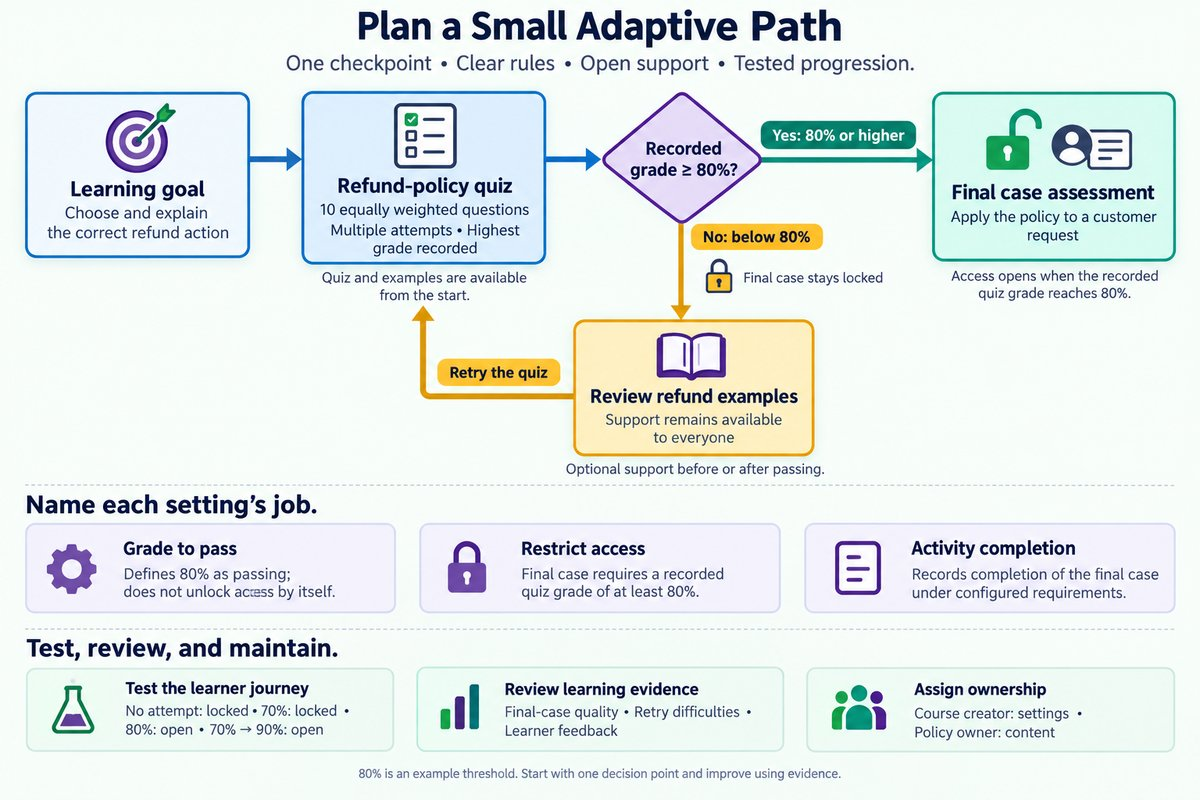
[[flowchart-placeholder]]
Do not require learners to pass the quiz before they can access that same quiz or its essential support. That creates a dead end, where a learner cannot meet a condition without entering an activity that is already locked. The quiz, support, and final assessment should each have a clear role. Test their relationships together rather than checking each setting alone.
Example: plan the refund-policy route
One Checkpoint, a Clear Route Forward
The course creator selects a 10-question policy quiz as the first checkpoint. Each question has equal weight, so eight correct answers produce 80%. The quiz checks policy knowledge, while a separate final case asks employees to apply that knowledge to a customer request.
The creator then turns the learning design into a short configuration plan. Multiple attempts are allowed, and the highest grade is used for routing. The final case has a grade-based access restriction with a minimum of 80%, while the support examples remain open to all learners.
- Input: 10 equally weighted questions. Set the quiz passing grade to 80%; output: a defined passing result.
- Input: a recorded grade of 60%. Keep the final case locked and explain the review-and-retry route; output: a clear next action.
- Input: a later recorded grade of 90%. Allow access to the final case; output: progression based on updated evidence.
- Input: a completed final case. Evaluate the employee’s applied response; output: evidence beyond policy recall.
The benefit is a shorter route for employees who already know the policy, without removing support from anyone. The limitation is that repeated quiz attempts may improve scores through familiarity rather than deeper understanding. The final case helps address that risk by checking application, and the onboarding team remains responsible for judging whether the assessment reflects workplace expectations.
Test the learner journey, not just the settings
A rule can look correct in Moodle while still producing a confusing learner experience. An employee may see a locked activity without understanding how to unlock it, or a retry may fail to update access as expected. Testing therefore needs to cover both the technical result and the instructions the learner sees. For the refund course, success means that every learner can identify an available, useful next action.
A pilot is a limited release used to check a design before wider use. Begin with controlled test cases, then use a small learner group to identify unclear instructions or unexpected barriers. A teacher’s view alone is not enough: use a test learner account and controlled grades to verify the route. Feature availability and menu labels can vary with Moodle version, permissions, and site settings, so confirm the required options with the site administrator.
Review should focus on learning as well as movement through the course. Faster completion may be useful, but it does not establish that employees make better refund decisions. Compare checkpoint results with final-case performance, and inspect points where learners repeatedly stop. Treat those patterns as signals to investigate, not automatic proof that the learner or the resource is at fault.
| Test case | Expected access | Expected learner message |
|---|---|---|
| No quiz attempt | Quiz and examples available; final case locked | Complete the quiz to determine readiness. |
| 70% recorded grade | Quiz retry and examples available; final case locked | Review the examples, then retry. |
| Exactly 80% | Final case available | The required score is met. |
| 70%, then 90% | Final case available after the passing grade is recorded | Continue to the final case. |
Example: use a pilot to choose the next improvement
The onboarding team pilots the refund course with 12 employees. In this illustrative example, four employees use the support route, and two of those employees report uncertainty about retrying the quiz. All four can technically retry, so the immediate issue is unclear guidance rather than a broken access rule.
The course creator responds with a small revision instead of adding another branch. The support page now ends with a direct instruction to return to the quiz and explains that a score of 80% opens the final case. The team also checks that the quiz allows another attempt under its configured attempt limits and timing settings.
- Input: two reports of retry confusion. Inspect the support page and quiz availability; output: a confirmed guidance issue.
- Input: unclear closing text. Add a specific retry instruction; output: a visible next action.
- Input: revised guidance. Retest with a learner account below 80%; output: confirmation that the route remains usable.
- Input: pilot findings. Record the change and assign an owner; output: a maintained improvement plan.
This revision improves clarity without increasing the number of routes. However, feedback from 12 employees cannot establish how well the design will work for every future group. The course owner should review later learner feedback and final-case results, especially when the organization changes its refund policy.
Keep the next step small and owned
A useful improvement plan identifies a specific change, a responsible person, and evidence for reviewing the result. “Make the course more adaptive” does not provide enough direction. “Clarify the retry route and verify it with a below-threshold learner account” describes work that can be completed and checked.
For the refund course, the plan can remain brief:
| Planning item | Agreed next step |
|---|---|
| Learning priority | Improve correct application of refund rules. |
| First release | One quiz checkpoint, open support examples, and one restricted final case. |
| Release check | Verify no-attempt, below-threshold, threshold, and successful-retry cases. |
| Owner | The course creator maintains settings; the policy owner confirms content accuracy. |
| Review evidence | Examine final-case quality, retry difficulties, and learner feedback after the pilot. |
A practical path to improvement
-
Start with a learning need, then choose evidence that supports a useful routing decision.
-
Keep the first path manageable, with clear conditions and an accessible support route.
-
Test the full learner journey, including threshold scores, retries, and locked-activity messages.
-
Improve with evidence, while keeping ownership and maintenance clear.
Effective adaptive course design connects learning goals, Moodle settings, and ongoing review. You do not need a large network of branches to make a useful difference. A small, well-tested path can give learners relevant support while giving your course team a design it can confidently maintain.