

Usability in e-Commerce
- View
Understanding Usability in e-Commerce
In today’s digital marketplace, usability is the cornerstone of any successful e-commerce site. Imagine trying to purchase a product online, but the navigation is confusing, buttons are mislabeled, or the checkout process is cumbersome. Such experiences not only frustrate customers but often lead to abandoned shopping carts. Usability directly impacts sales, customer retention, and brand reputation. As we explore the world of usability in e-commerce, we’ll uncover key strategies to ensure an intuitive and satisfying user experience.
What is Usability?
Usability in the context of e-commerce refers to the ease with which customers can navigate and interact with an online store. It encompasses several aspects:
-
Effectiveness: Can users achieve their goals on your site?
-
Efficiency: How quickly and easily can users accomplish their objectives?
-
Satisfaction: Do users enjoy their experience enough to return?
Usability is crucial for converting site visitors into customers. A site with high usability reduces friction points, ensuring users can find what they need without extra effort. Picture usability as the foundation of a house; without it, everything else crumbles.
Designing for Optimal Usability
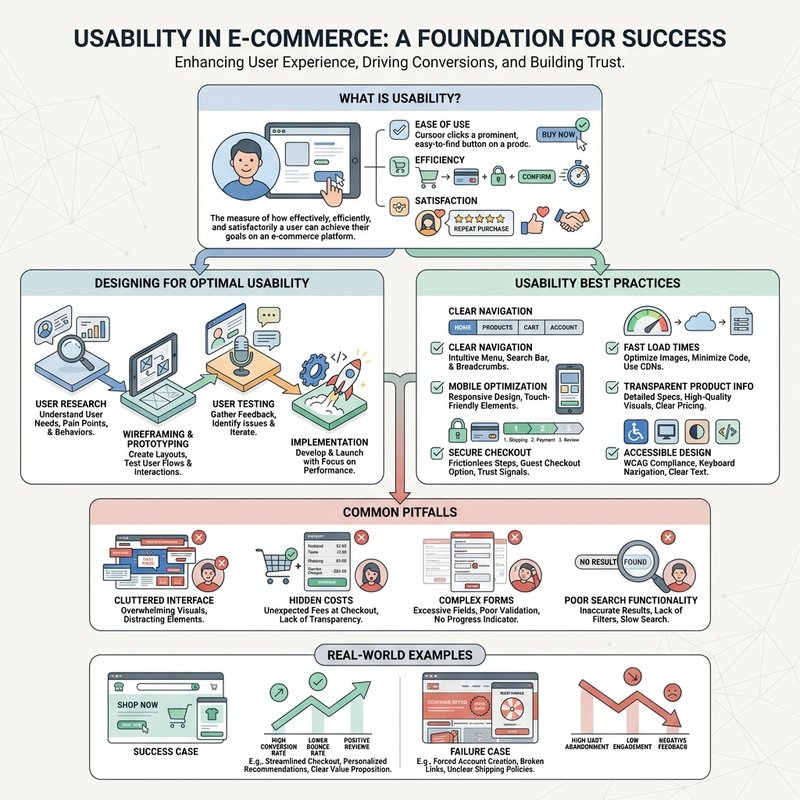
Creating a usable e-commerce website begins with understanding the core principles:
-
Intuitive Navigation: Users should be able to find information without a single misstep. This means having clear, predictable menus and site hierarchies.
-
Responsive Design: With a significant amount of shopping occurring on mobile devices, ensuring your site maintains its usability across different platforms is crucial.
-
Clear Calls-to-Action: Every page should guide users towards meaningful actions, whether it’s buying, learning more, or signing up.
Usability Best Practices
- Consistent Layouts: Use familiar design patterns and layouts. For example, placing the shopping cart icon in the upper right corner allows users to intuitively know where to look.
- Descriptive Labels and Icons: Elements should be clearly labeled to prevent user confusion. For example, a button labeled "Buy Now" is more clear than just "Buy."
- Improved Search Functionality: Users should be able to find products using search terms they're likely to think of, suggesting results as they type.
Common Pitfalls in e-Commerce Design
Despite its importance, some common usability pitfalls occur frequently in e-commerce:
-
Overwhelming Choices: Presenting too many options can lead to decision paralysis. Simplifying and categorizing products can help.
-
Unclear Error Messages: Helping users recover from errors quickly is crucial in maintaining flow and satisfaction.
-
Complicated Checkout Process: Requiring unnecessary steps or information can lead to cart abandonment.
Addressing Misconceptions
A common misconception is that a visually stunning website will suffice without usability considered. Beautiful visuals are important, but if users can't navigate the page effectively, the design fails.
Real-World Examples of e-Commerce Usability
Example 1: Amazon's Efficient Navigation
Amazon leverages usability by allowing customers to toggle between vast product categories with ease. Its well-organized navigation bar and filters enhance findability, demonstrating the importance of intuitive navigation.
Example 2: Shopify's Seamless Checkout
Shopify-powered sites often highlight high usability, particularly in checkout processes. The platform demonstrates optimized usability by simplifying checkout steps and retaining cart contents across sessions.
These examples illustrate how critical usability aspects are integrated into real-world applications, directly influencing the success and effectiveness of e-commerce platforms.
Key Insights and Next Steps
This lesson emphasized the pivotal role of usability in e-commerce, detailing how user-friendly design impacts customer satisfaction and business performance.
Takeaways:
-
Usability is central to successful e-commerce, directly affecting consumer behavior and sales.
-
Applying core principles like intuitive navigation and responsive design enhances usability.
-
Avoid common pitfalls by focusing on simple choices and clearly labeled interfaces.
With these insights, you can create a more rewarding online shopping experience for your customers. Now that the foundation is in place, we'll move into Visual Hierarchy and Consistency to further refine our approach to design.